Code Generation
The last step is to generate the code and deploy the model on the board. To generate the code, follow the steps:
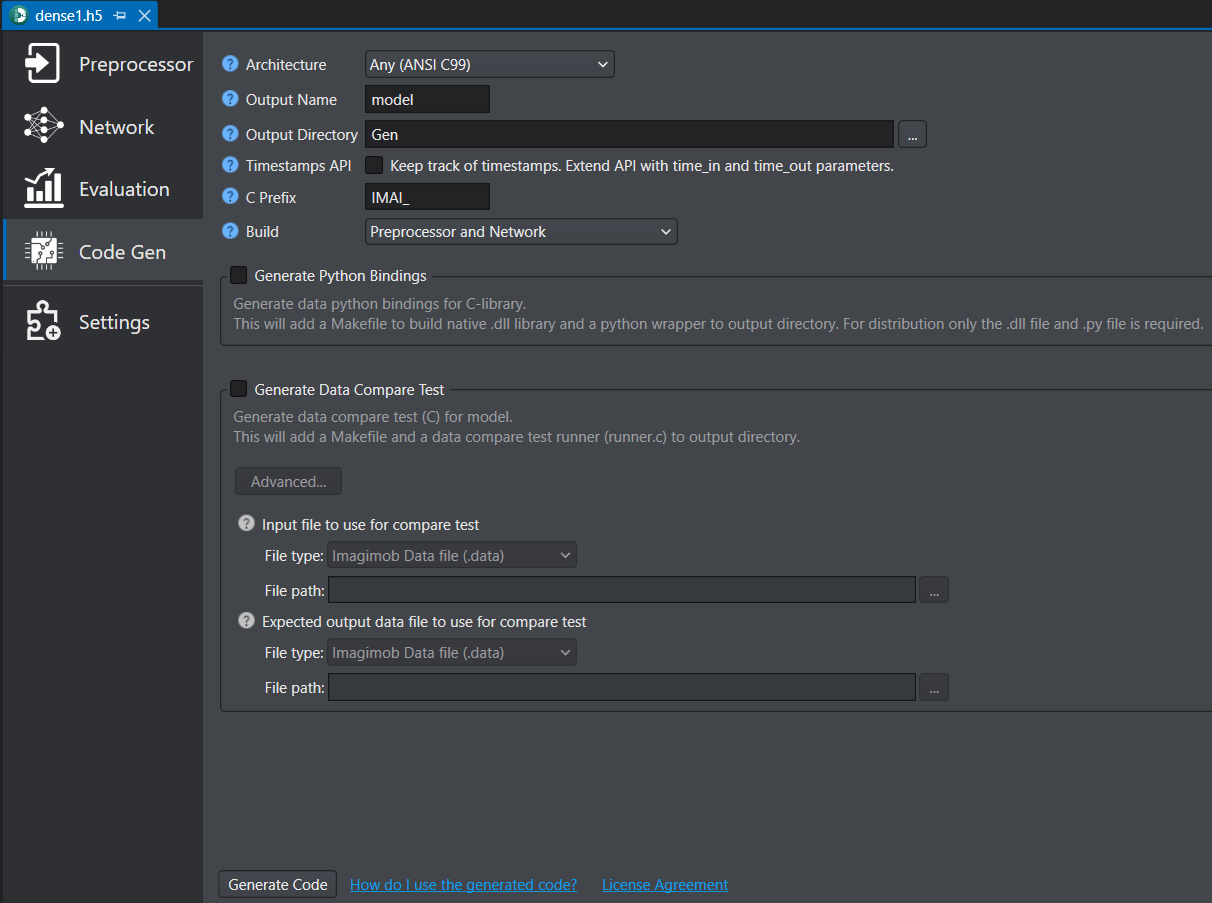
-
Double click the HDF5 (*.h5) model and click the Code Gen tab on the left pane.
-
In Architecture select Any(ANSI C99) as the target architecture for optimization.
-
In Output name enter the name for the generated .c/.h files.
-
In Output directory browse the directory where you want to save the optimized output. By, default Gen is selected as the default folder.
-
In Timestamps API enable the checkbox to track corresponding input time for each output prediction. To know about the edge API, refer to Edge API.
-
In C Prefix enter the prefix for the function names in the optimized C API. For instance, BTN_NN_, when generating the code for button detection model.
-
In Build select the build type as Preprocessor and Network.
-
Click Generate Code. The code is generated and the Code generation Report window appears. The optimized C-code along with ‘Makefile’ and ‘runner.c’ is automatically saved in the Gen folder. This is the folder that you select in the Output Directory parameter.
Similarly, you can generate code for slider gesture recognition and slider position calculation.