PSOC™ 4100S Max Pioneer Kit
The PSOC™ 4100S Max pioneer kit is a comprehensive development board that provides developers with a complete ecosystem for prototyping and developing embedded applications, with particular emphasis on capacitive touch sensing through CapSense technology. The PSOC™ 4100S Max MCU is a true programmable embedded system-on chip, integrating custom digital and analog peripheral functions, memory, and an Arm® Cortex®-M0+ MCU on a single chip with flexible automatic routing, and the 5th generation multi sense converter (MSC) - a capacitive sensing system with best-in-class performance.
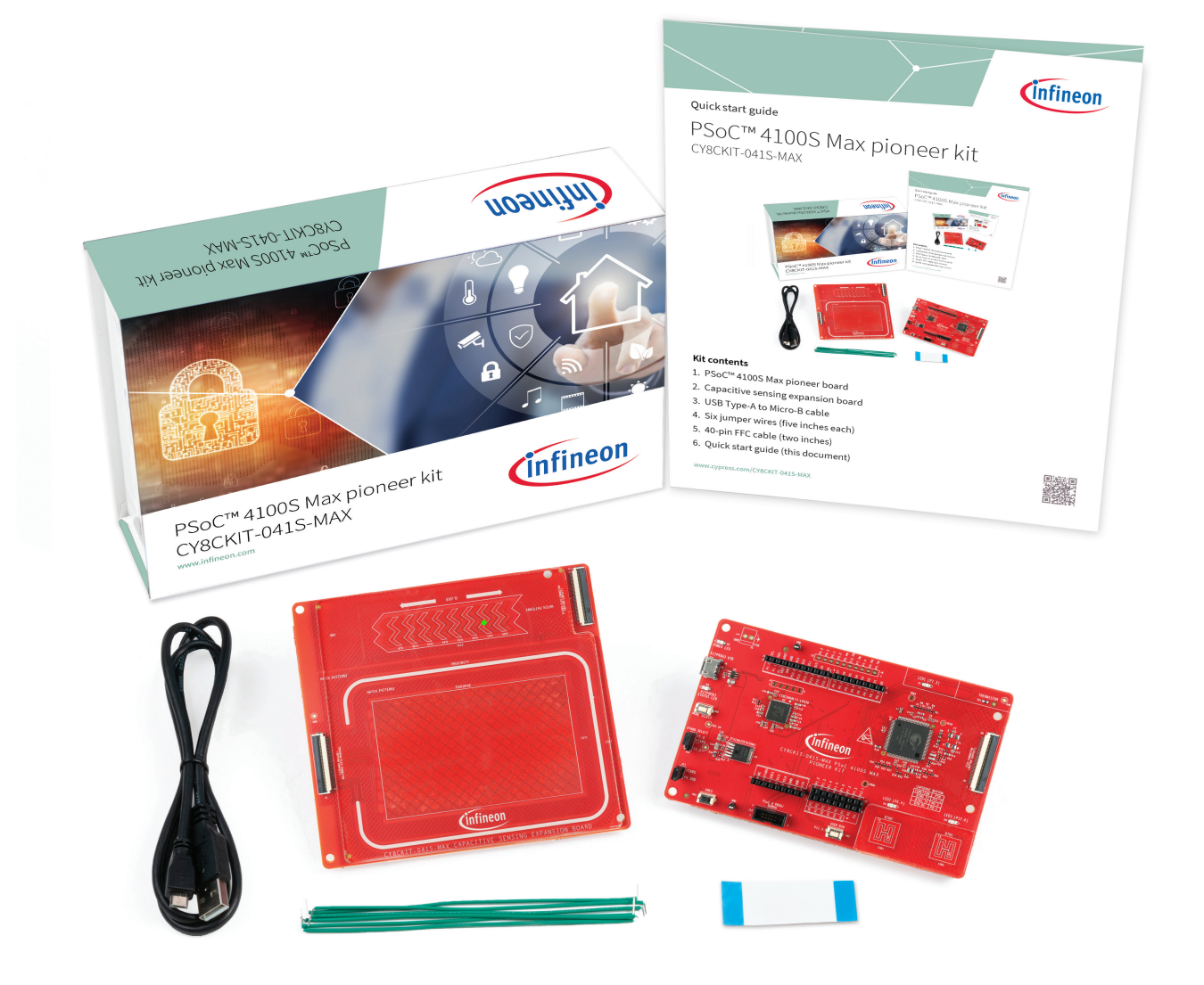
The kit comes with two boards, CY8CKIT-041S-MAX PSOC™ 4100S Max pioneer board and CY8CKIT-041S-MAX capacitive sensing expansion board. The PSOC™ 4100S Max pioneer board consists of a PSOC™ 4100S Max MCU, an onboard programmer/debugger (KitProg3), voltage regulators, user LEDs and CAPSENSE™ buttons, thermistor, a micro-B connector for USB device interface, crystal oscillators and other passives. The capacitive sensing expansion board consists of CAPSENSE™ Touchpad, Slider and proximity sensors.
Capacitive sensing is a versatile and efficient way to measure capacitance and detect finger touches in user interface panel applications such as capacitive touch buttons, sliders, touch pads, touch screens and proximity sensors. The PSOC™ 4100S Max pioneer kit introduces an evaluation platform for the 5th generation CAPSENSE™ - multi sense converter in PSOC™ 4100S Max devices. Refer the AN85951 - PSOC™ 4 and PSOC™ 6 MCU CAPSENSE™ Design Guide to know the detailed features of 5th generation CAPSENSE™ - multi sense converter.
For more information, refer to PSOC™ 4100S Max Pioneer Kit
Kit contents
The PSOC™ 4100S Max pioneer kit box includes the following:
- PSOC™ 4100S Max pioneer board
- Capacitive sensing expansion board
- USB Type-A to Micro-B cable
- Six jumper wires (5 inches each)
- 40-pin FFC (2 inches)
- Quick start guide
 |
|---|
Key applications
Following are some of the applications that you can build using the kit:
| Category | Applications |
|---|---|
| Smart Sensors | Buttons or sliders, level sensing, smart home and kitchen appliances |
| Automotive HMI | Door handle and foot-kick detection, Capacitive navigation, Occupant detection |
Streaming Firmware for PSOC™ 4100S Max Pioneer Kit
Flash the kit with the provided hex file to stream sensor data from the USB port of the kit into DEEPCRAFT™ Studio, enabling rapid data collection and model development. This hex file supports data collection from the CAPSENSE™ Buttons, Touchpad and Slider.
We are also providing the firmware source files used to build the hex file, which allows firmware customization as needed. Access the firmware repository here: Streaming protocol capsense. The firmware uses Streaming Protocol Version 2. For instructions on modifying the existing firmware or implementing new streaming firmware for the board, refer to Registering sensors and boards for data streaming using Protocol version 2.
Flashing the Streaming Firmware
To flash the streaming firmware onto the kit, follow the pre-requisites and steps outlined below:
Pre-requisites:
- Streaming Firmware - PSOC™ 4100S Max Pioneer Kit (HEX File)
- Download and Install ModusToolbox™ Programmer v3.8 and above (Flash Utility)
- PSOC™ 4100S Max pioneer kit (CY8CKIT-041S-MAX)
Steps to flash the Streaming Firmware
-
Download and unzip the hex file to flash the Streaming Firmware onto the board.
-
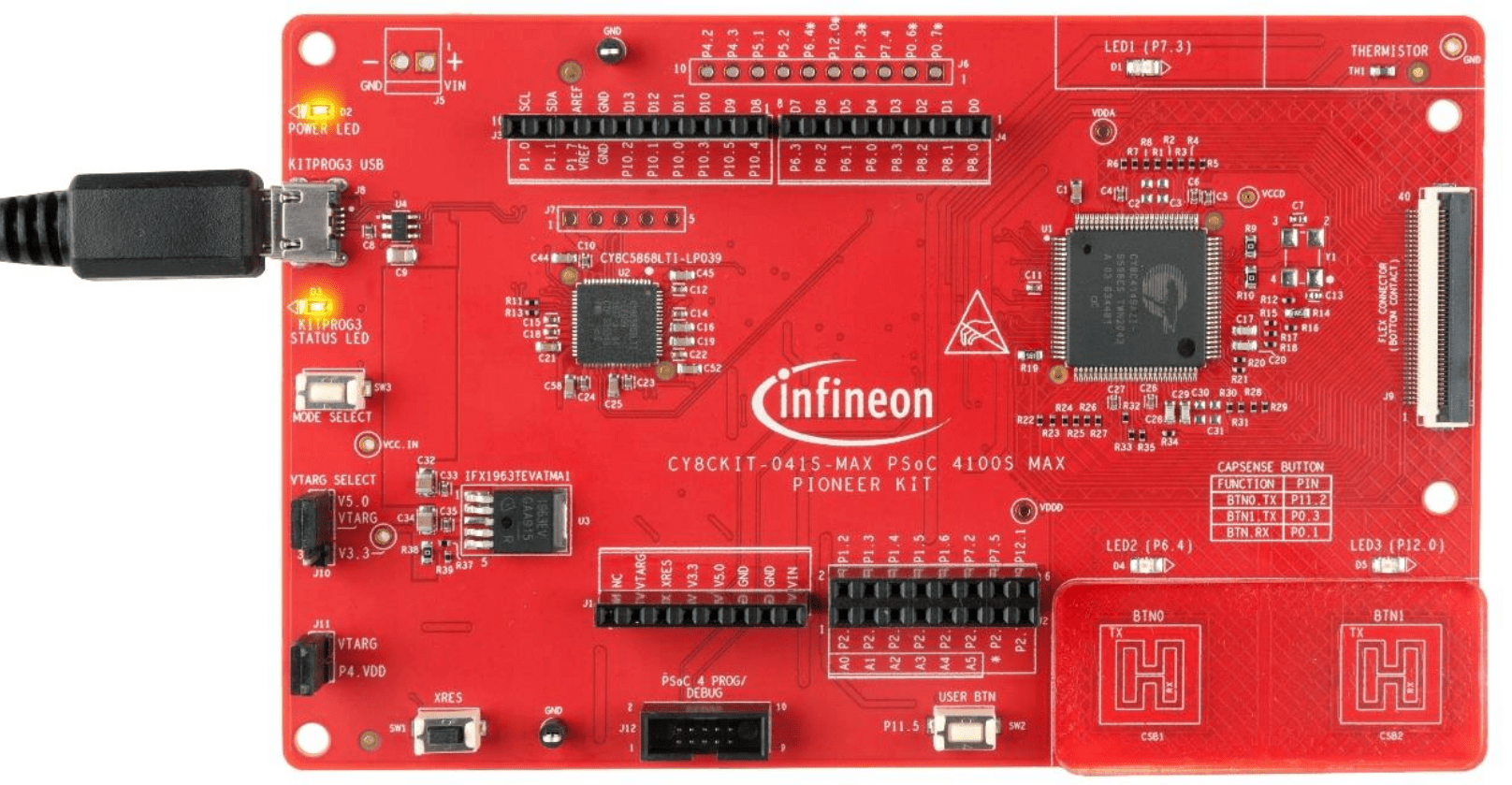
Connect the KitProg3 USB connector (J8) port on the board to the PC using the USB Type-A to Micro-B cable. Ensure that the power LED (D2, yellow) and status LED (D3, yellow) on the base board are ON.
 |
|---|
-
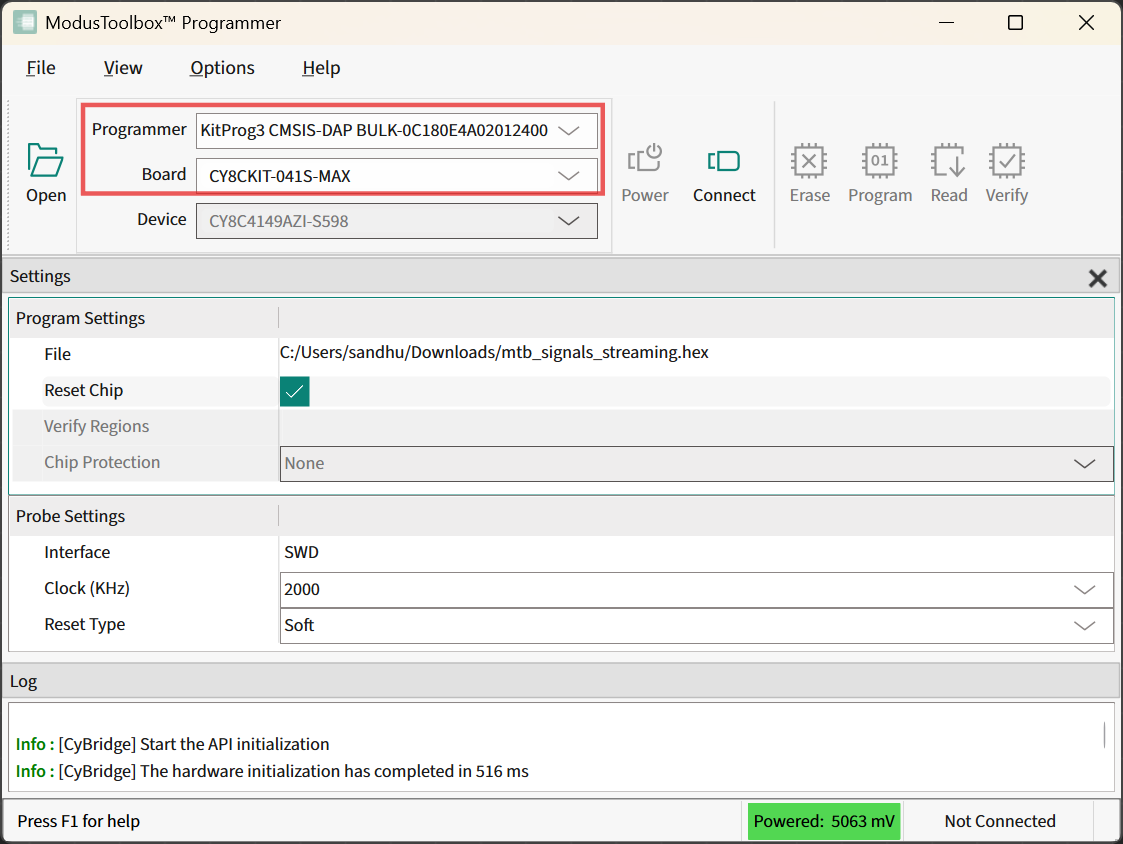
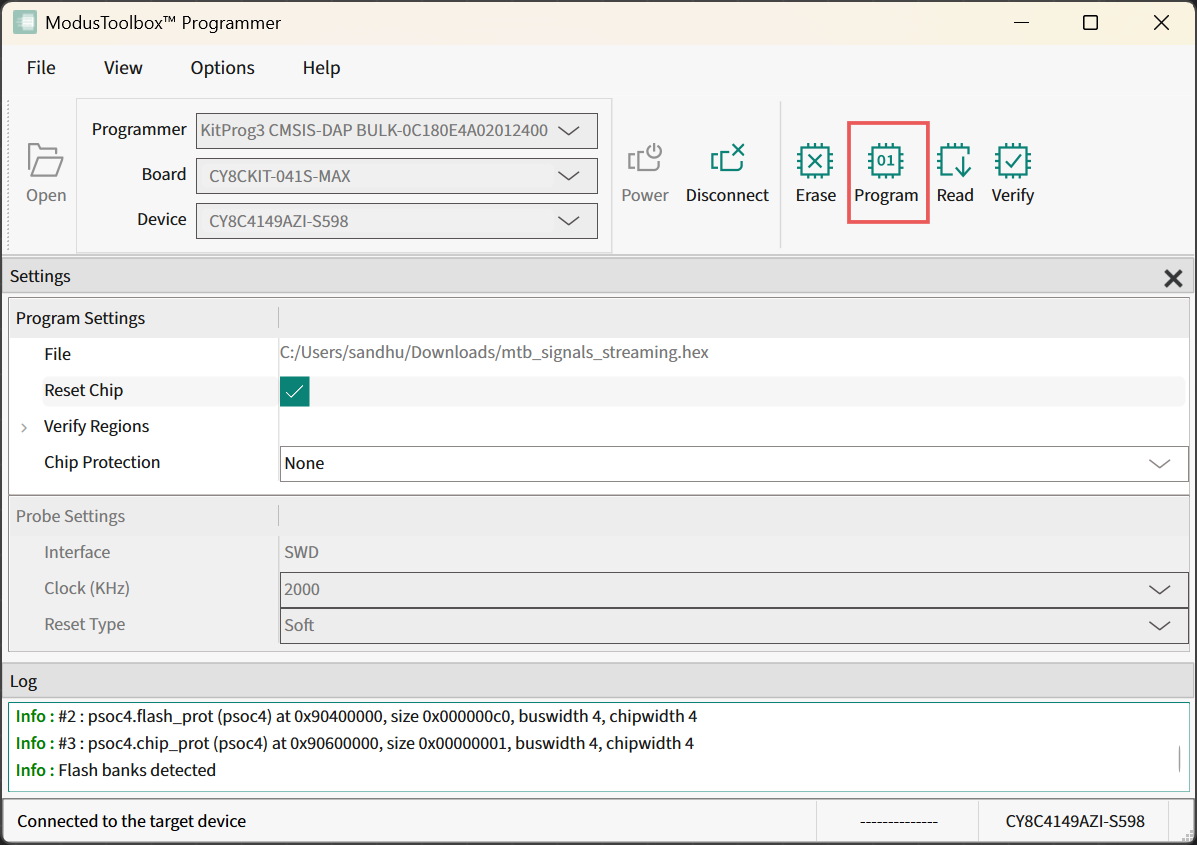
Open ModusToolbox™ Programmer from the Windows Start menu. The ModusToolbox™ Programmer window appears.
-
In Programmer drop-down, select the device type as KitProg3 CMSIS-DAP BULK-XXXXXXXXXXXXXXXX.
-
In Board drop-down box, select the board type as CY8CKIT-041S-MAX.
-
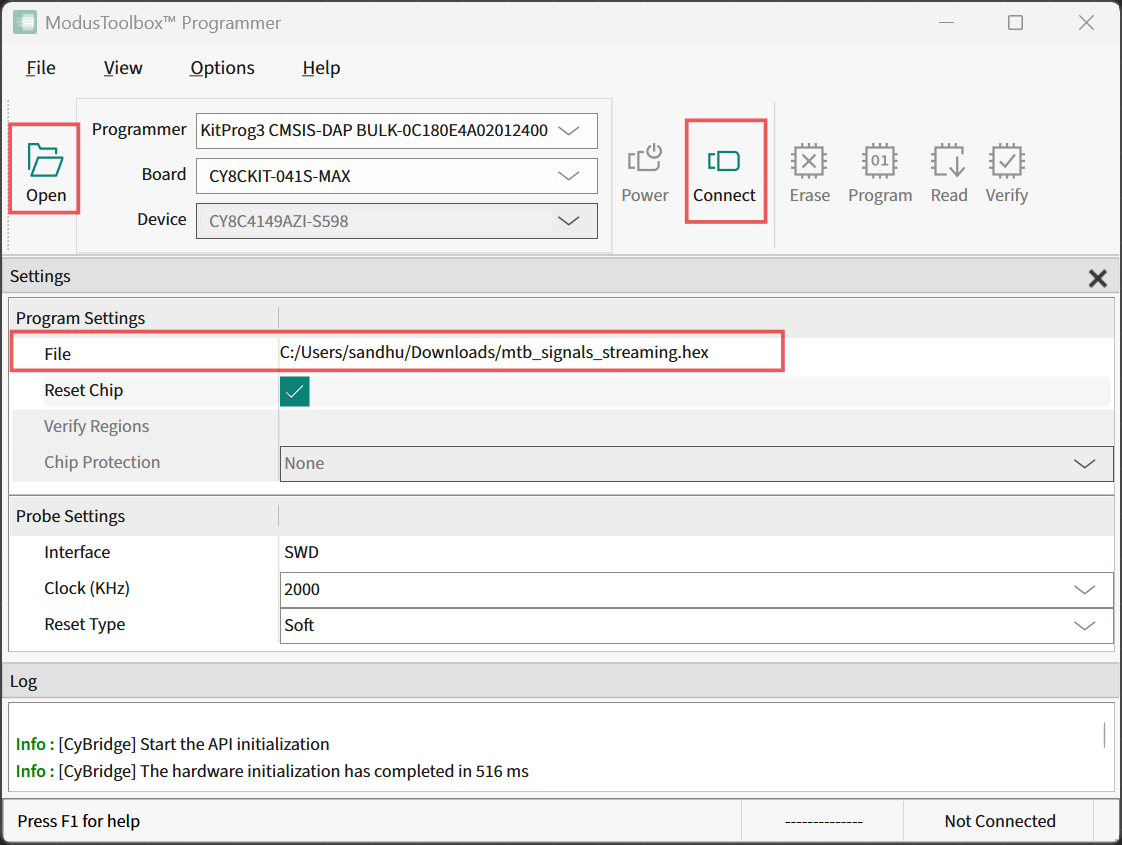
Click Open, browse to the Streaming Firmware (hex file) downloaded earlier.
-
Click Connect to establish a connection between the board and the ModusToolbox™ Programmer.
-
Click Program to flash the Streaming Firmware on the board. The kit is programmed successfully.
What’s Next?
After flashing the kit with the streaming firmware, you can follow Building Capacitive Sensing machine learning models tutorial and learn how to build different capacitive models in DEEPCRAFT™ Studio.