Exporting data to a training project from Dataset
Once you have collected and labeled the data in your Dataset, export it to a training project so you can train your model.
To export data to a training project:
-
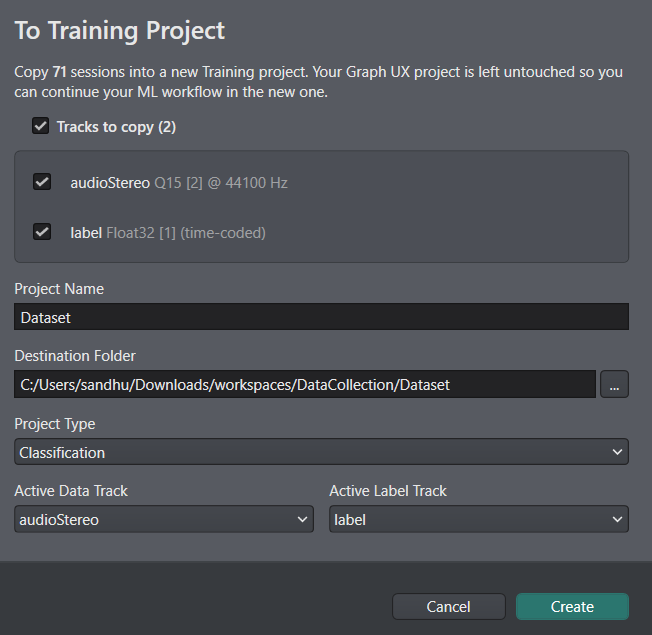
Click the To Training Project button at the bottom of the Dataset. The Export data to training project window opens.
-
Select the tracks you want to copy from the Dataset node to the training project.
-
In Project Name, enter a name for the project where you want to save the data.
-
In Location, choose where to save the project.
-
In Project Type, select the type of project you want to create for training the model: regression or classification.
-
In Active Data Track, select the data track you want the model to use for training.
-
In Active Label Track, select the label track that holds the labels for the selected data track.
-
Click Create to create the training project.
-
Click Open Project to open it.
DEEPCRAFT™ Studio saves the training project in your workspace as a folder with the project name, and opens the project file (.improj). The project file shows the data track and label track you selected, in the Active Data Track and Active Label Track fields.
From here, continue with the standard machine learning workflow in DEEPCRAFT™ Studio:
- Distribute the data across the training, validation, and test sets. For more information, refer to Data Distribution.
- Train the model. For more information, refer to Model Training.
- Deploy the model to your edge device. For more information, refer to Deployment.